Alpha&ESM hFolds

A database for the comparison of structural models predicted by ESMFold and AlphaFold2 for human proteins.
Now updated with Quality Assessment and Functional characterization of the models.
Part of the Bioinformatics Sweeties collection.

From the home page of the web server, it is possible to query the model database in two ways:

  • UniProt accession: the accession is searched against the database and, if present, all data for the entry are shown. Otherwise, an error message is displayed prompting the user to go back to the home page.

    The same search functionality is available also outside the home page, through the “Quick search” field in the navigation bar at the top of each page.

  • FASTA sequence: the protein is aligned against all the sequences present in our database using BLAST. Depending on the results, a list of at most 10 entries is displayed.

    • If a perfect match is found, only the corresponding entry will be displayed.

    • If at least one significant match is found, the best significant hits will be displayed. We consider a hit to be significant if it has an e-value lower than 0.001 and a sequence identity greater than 50% over a coverage greater than 70%.

    • If no significant match is found, the best hits will be displayed alongside a warning message.

    • If no hit is found, an error message is displayed prompting the user to go back to the home page.

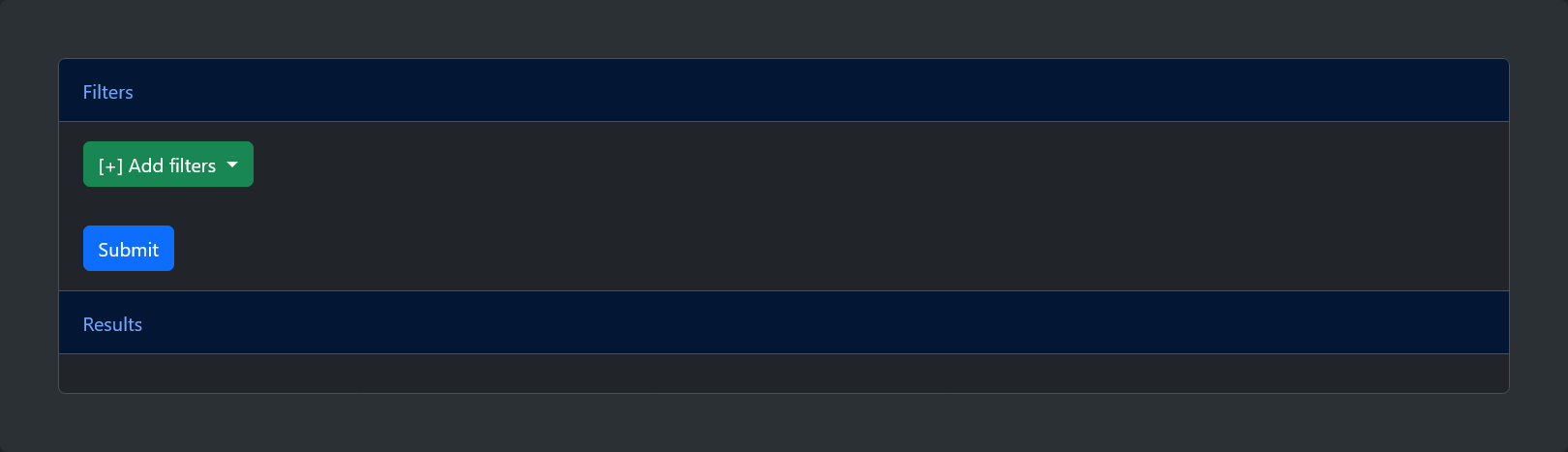
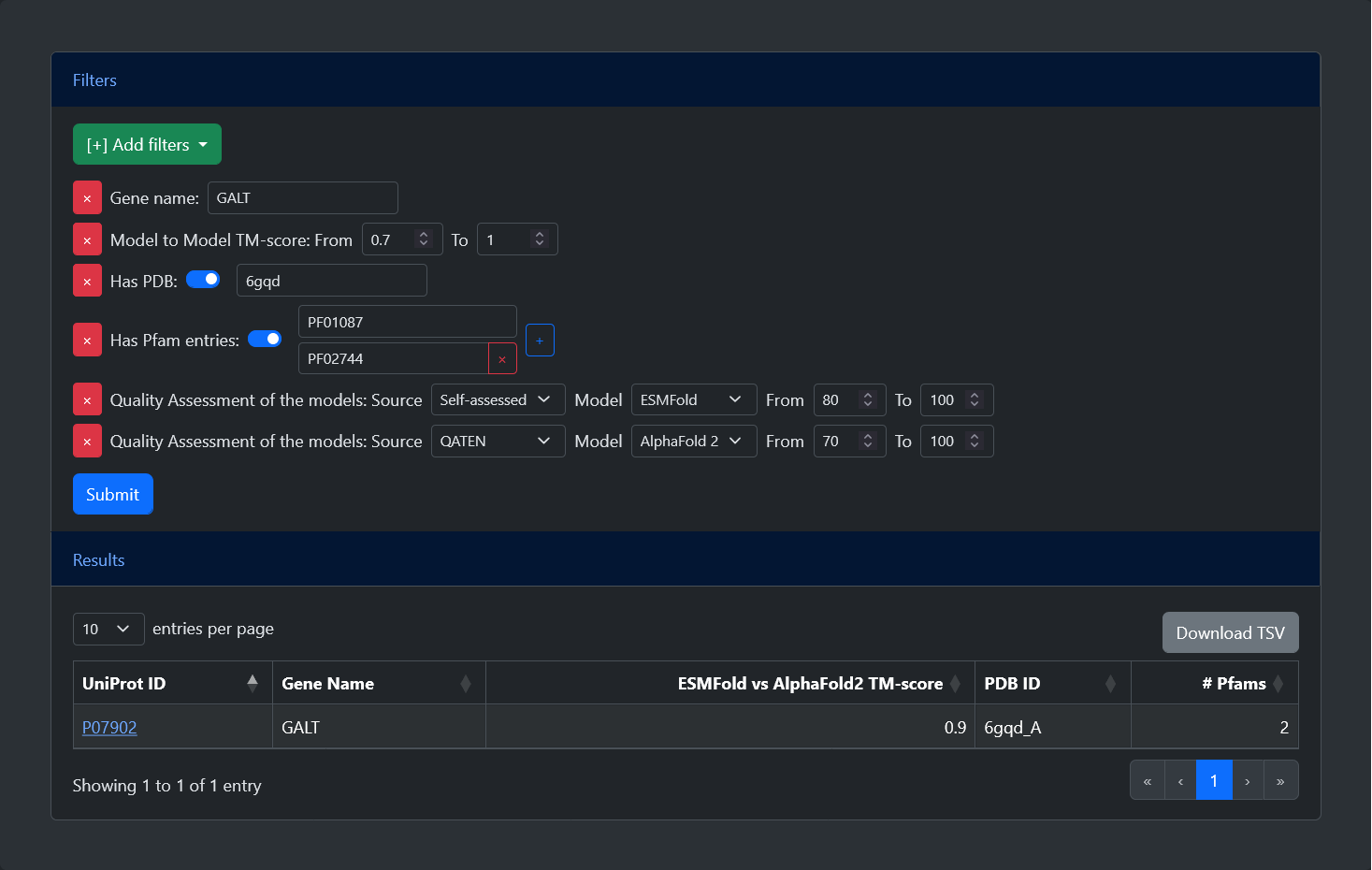
The advanced search allows users to select and apply different filters. After pressing the submit button, a table will be generated with all entries which satisfy the criteria. Additional buttons to reset the form, to show an example query, and to navigate to this help page are available. Below, is a list of all available filters:

  • Gene name: Entries can be filtered by their gene name. Leaving this field empty after selecting the filters will select all possible entries.

  • TM-score: Entries can be filtered based on the TM-score between the ESMFold and AlphaFold2 models. The TM-score goes from 0 (no overlap) to 1 (perfect overlap) and the user can set the minimum and maximum values. The default range from 0 to 1 selects all possible entries.

  • Has PDB: Entries can be filtered based on the availability of an experimental structure. After selecting the filter, a switch can be turned on or off to select only entries with or without a PDB structure. If the flag is turned on, it is also possible to search for a specific PDB ID.

  • Has Pfam: Entries can be filtered based on the availability of functional annotation. After selecting the filter, a switch can be turned on or off to select only entries with or without annotated Pfam entries. If the flag is turned on, it is also possible to search for a specific Pfam ID. A "+" button allows to add as many fields as desired, allowing users to search for proteins with all specified Pfam entries.

  • Quality Assessment:Entries can be filtered based on the quality of the models, expressed by their pLDDT. After selecting the filter, it is possible to specify the source of the pLDDT (either Self-assessed, indicating the score given in output by the methods, or one among three external Quality Assessment tools, namely DeepAccNet, QMeanDISco, or QATEN), the model (either ESMFold or AlphaFold 2), and the minimum and maximum values of the pLDDT (between 0 and 100). This is the only filter which can be selected multiple times, allowing the selection of different criteria

For all entries in the model database, the visualization page shows multiple information.

  • Protein information: At the top of the page, a table is displayed that contains general information on the selected protein, including:

    • Protein name, gene name and UniProt accession (with a cross-link to the corresponding UniProt page).

    • Sequence length.

    • Protein source (either SwissProt or TrEMBL).

    • Presence of Signal or Transit peptide.

    • Highest-coverage PDB Chain (with a link to the corresponding PDB page). This field is present only if the PDB chain has a sequence coverage of the ATOM residues of at least 70%.

    • Alternatively, if the sequence is highly similar (more than 50% of similarity over a coverage of at least 70%) to an entry endowed with a PDB structure, a link to the putative template is shown.

    A more complete list of information on the entry can also be downloaded in JSON format.

  • Comparing ESMFold and AlphaFold2 models: A tab displays the comparison between the AlphaFold2 and ESMFold computed structures. This includes:

    • The sequence alignment obtained from the superimposition of the two structural models. Residues are coloured according to the model confidence (pLDDT), while a green bar highlights residues which correctly match.
      A FASTA-like file containing the alignment is available for download. The file will contain two gapped sequences with their corresponding ids.

    • The structure superimposition of the two models. Two different colours are adopted to distinguish ESMFold models (green) and AlphaFold2 models (purple). The graphical viewer is our implementation of PDBe Mol* and can be similarly interacted with (see original documentation; some operations are not available in our viewer). Additionally, residues shown in the sequence alignment can be clicked to zoom in on the corresponding position.
      Both models, as well as their superimposition, are available for download in PDB format.

    • A menu with different tabs reporting useful information, including:

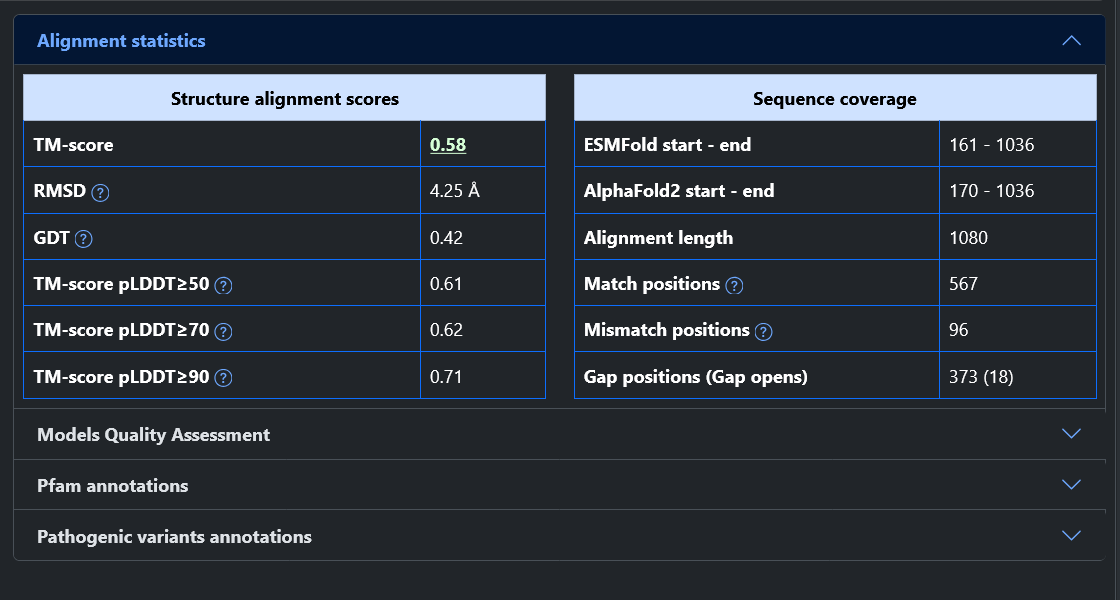
      • Alignment statistics: Visualize different statistics regarding the superimposition of the two models. Amongst other, The TM-score is visualized with a gradient color from red (0, no superimposition) to green (1, perfect superimposition). Other statistics include the coverage of the sequence alignment obtained by the structural superimposition, including the number of matches and gaps.

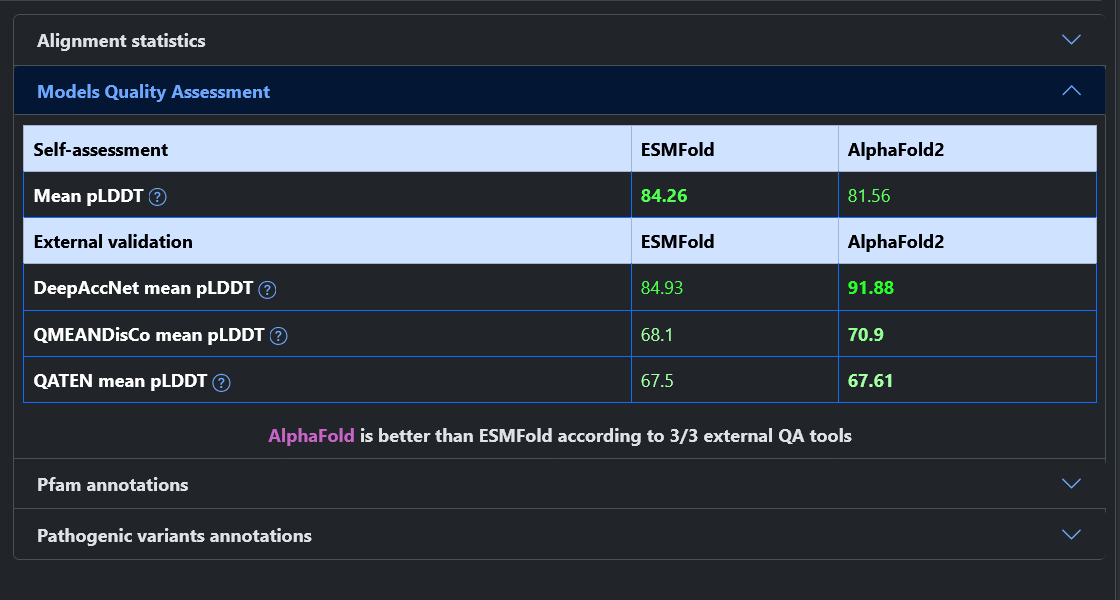
      • Model Quality Assessment: Show the quality of both models, represented by the pLDDT. Values are visualized with a gradient color from red (0, not reliable) to green (100, reliable). The table is divided in two parts: one includes the Self-assessment of the two methods (i.e. the pLDDT predicted by AlphaFold 2 and ESMFold for their respective models); the other includes the External validation carried out by DeepAccNet, QMEANDisCo, and QATEN. After the table, we report a sentence indicating which model is to be preferred according to a consensus of the external tools.

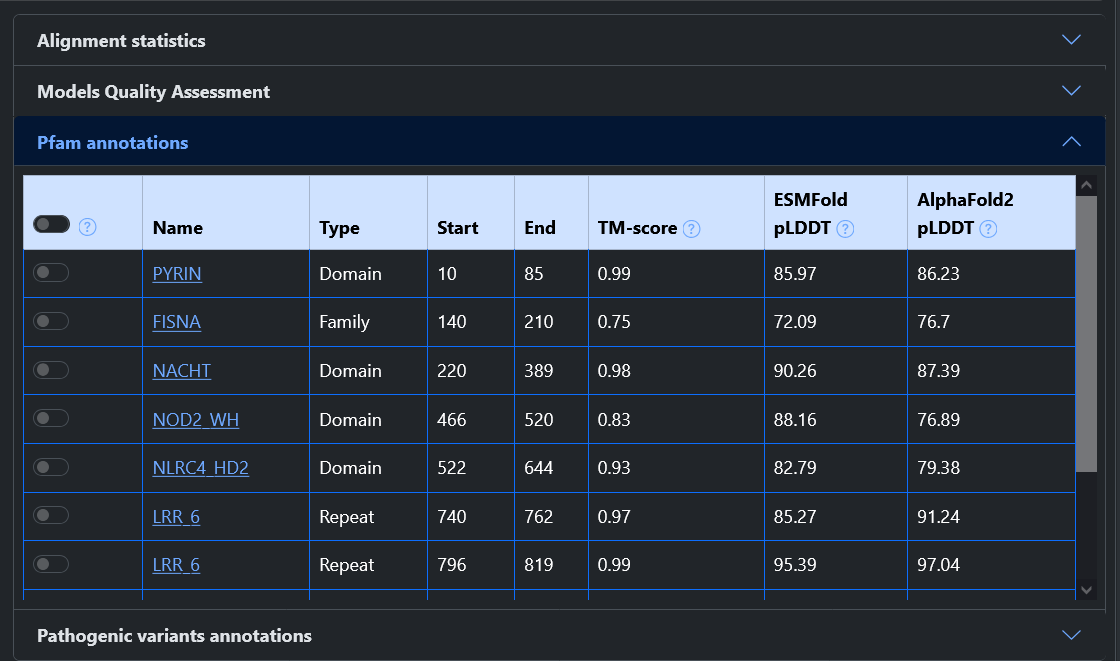
      • Pfam annotations: If present, a list of all Pfam entries annotated on the protein sequence is listed here. For each Pfam, we report its name (with a link to InterPro), its type, and its position. Additionally, we report the TM-score and the pLDDT recomputed only on the region of the models covered by that Pfam. Each entry can be selected with a button, highlighting the corresponding region of both models in the 3D viewer as well as in the sequence alignment. Multiple Pfam entries can be selected together, and at the top a button allows to select and deselect all of them.
        Please note: To compute the TM-score, the portions of the models were cut and superimposed again. This could potentially lead to Pfams with very high TM-score that are not visually superimposed because other regions of the proteins where prioritized by Foldseek when considering the whole models.

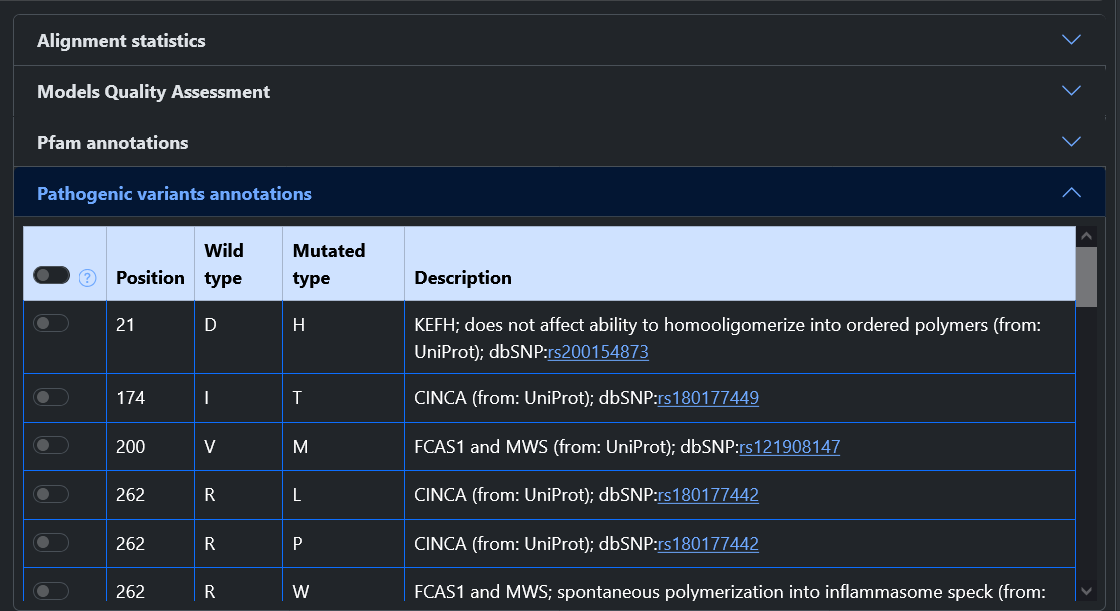
      • Pathogenic variations: If present, a list of all pathogenic variations annotated in UniProt for the protein is listed here. For each variation, we report its position, the residues involved, and a description with a link to dbSNP. Each entry can be selected with a button, highlighting the corresponding residue of both models in the 3D viewer as well as in the sequence alignment. Multiple variations can be selected together, and at the top a button allows to select and deselect all of them.

      The statistics here reported are included in the JSON file that can be downloaded from the table at the top of the page.

  • Comparing predicted models and PDB chain: Finally, if the entry is endowed with a PDB chain, two similar tabs show the comparison between the experimental model and each predicted model.
    In this case, PDB chains are coloured in white in the graphical viewer, and the Alignment Statistics are the only one reported at the right.